Achievements: Difference between revisions
From Ultimate Dragon Ball Online Wiki
No edit summary |
No edit summary |
||
| Line 1: | Line 1: | ||
__FORCETOC__ | __FORCETOC__ | ||
Revision as of 19:29, 26 December 2025
Achievement System
Track your progress and unlock rewards by completing achievements in Ultimate DBO!
Accessing Your Achievements
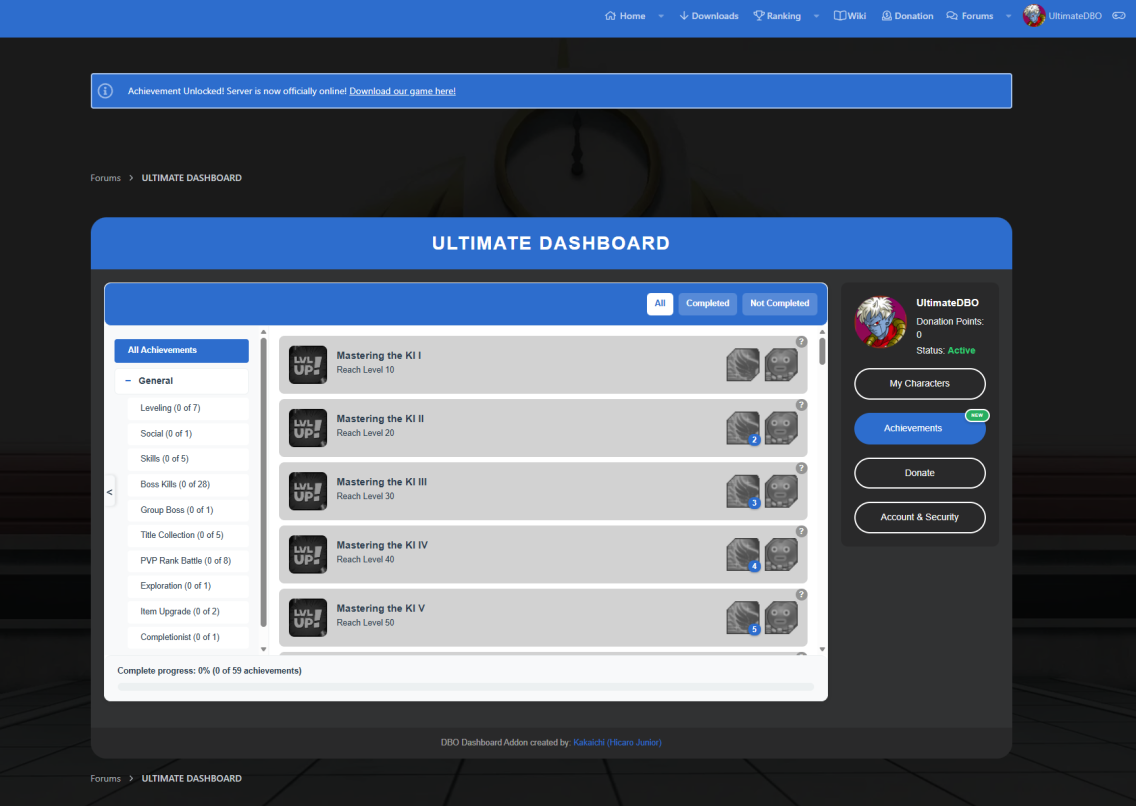
To view your achievements, log in to your Forum account. At the top of the forum, you'll find a Controller icon — click it to open your personal Dashboard Panel.
Then, navigate to the Achievements section to see all available achievements and your progress.


You can Open the achievement page by clicking in the U inside the game.

Understanding Achievements
The Achievement System tracks your accomplishments throughout your journey in Ultimate DBO. Each achievement has:
- A achievement name and it's goal
- A category for easy organization
- Completion status (completed or in progress)
- Rewards that are stored in your Donation Storage

Achievement Rewards
When you complete an achievement, the rewards are automatically stored in your Donation Storage.
You will receive a message in-game telling that a Achievement has been completed.


🏆 Complete achievements, earn rewards, and showcase your accomplishments in Ultimate DBO! 🏆
