Change Appearence: Difference between revisions
From Ultimate Dragon Ball Online Wiki
No edit summary |
No edit summary |
||
| Line 1: | Line 1: | ||
[[Category:Game | [[Category:Game Features]] | ||
== Changing Your Game Appearance == | == Changing Your Game Appearance == | ||
Revision as of 16:46, 13 October 2025
Changing Your Game Appearance
In Ultimate DBO, you have the freedom to change your character’s appearance at any time!
🧭 Accessing Your Dashboard
To begin, log in to your Forum account. At the top of the forum, you’ll find a Dashboard icon — click it to open your personal Dashboard Panel.


🎨 Editing Your Appearance
Once your character has been created in-game, you can modify their look anytime by clicking the Edit Appearance button in your dashboard.
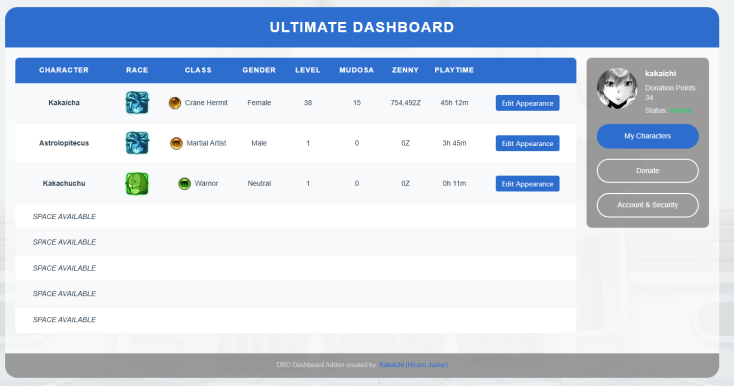

✂️ What You Can Customize
You can freely change the following aspects of your character:
- Hair style
- Hair color
- Face
- Skin tone
All with just a short cooldown of a few minutes between edits!
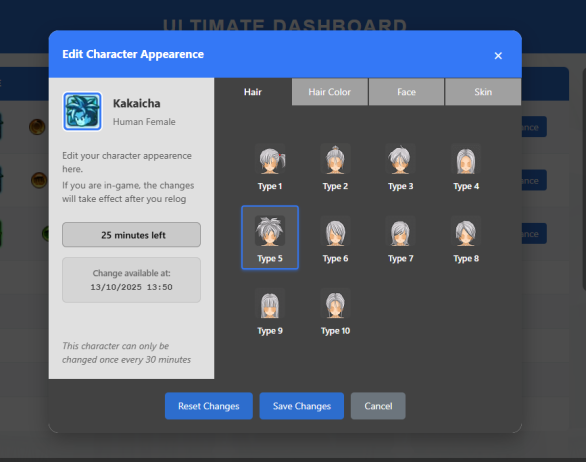

✨ Express yourself! Customize your look anytime and stand out in the world of Ultimate DBO! ✨
