Change Appearence: Difference between revisions
From Ultimate Dragon Ball Online Wiki
Created page with "In Ultimate DBO, you have the possibility to change your Game Appearenmce at any given time. To do that, Login in your Forum, in the Top Bar of your forum you will have a Dashboard Icon, clicking in that Dashboard Icon you will have your Dashboard Painel. File:Dashboard.png After your character be created in the game, you can change your character appearence clicking in the "Edit Appearence" button. 734x734px You can change your Hair, Hai..." |
No edit summary |
||
| (4 intermediate revisions by the same user not shown) | |||
| Line 1: | Line 1: | ||
[[Category:Game Features]] | |||
== Changing Your Game Appearance == | |||
''In Ultimate DBO, you have the freedom to change your character’s appearance at any time!'' | |||
---- | |||
=== 🧭 Accessing Your Dashboard === | |||
To begin, '''log in to your Forum account'''. | |||
At the top of the forum, you’ll find a '''Controller icon''' — click it to open your personal '''Dashboard Panel'''. | |||
[[File: | <div style="text-align:center;"> | ||
[[File:Screenshot1.png]] | |||
</div> | |||
---- | |||
[[File:Dashboard3.png|586x586px]] | === 🎨 Editing Your Appearance === | ||
Once your character has been created in-game, you can modify their look anytime by clicking the '''Edit Appearance''' button in your dashboard. | |||
<div style="text-align:center;"> | |||
[[File:Dashboard2.png|734x734px]] | |||
</div> | |||
---- | |||
=== ✂️ What You Can Customize === | |||
You can freely change the following aspects of your character: | |||
* '''Hair style''' | |||
* '''Hair color''' | |||
* '''Face''' | |||
* '''Skin tone''' | |||
All with just a short cooldown of a few minutes between edits! | |||
<div style="text-align:center;"> | |||
[[File:Dashboard3.png|586x586px]] | |||
</div> | |||
---- | |||
<div style="background-color:#222; color:#00ffff; border:2px solid #00bcd4; padding:10px; border-radius:10px; text-align:center; font-weight:bold;"> | |||
✨ Express yourself! Customize your look anytime and stand out in the world of Ultimate DBO! ✨ | |||
</div> | |||
Latest revision as of 19:34, 26 December 2025
Changing Your Game Appearance
In Ultimate DBO, you have the freedom to change your character’s appearance at any time!
🧭 Accessing Your Dashboard
To begin, log in to your Forum account. At the top of the forum, you’ll find a Controller icon — click it to open your personal Dashboard Panel.


🎨 Editing Your Appearance
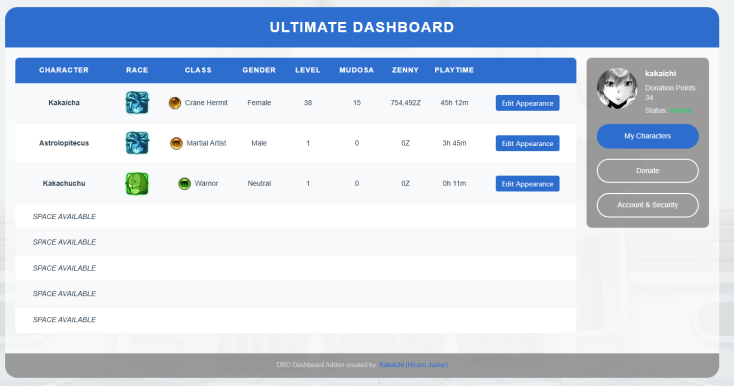
Once your character has been created in-game, you can modify their look anytime by clicking the Edit Appearance button in your dashboard.

✂️ What You Can Customize
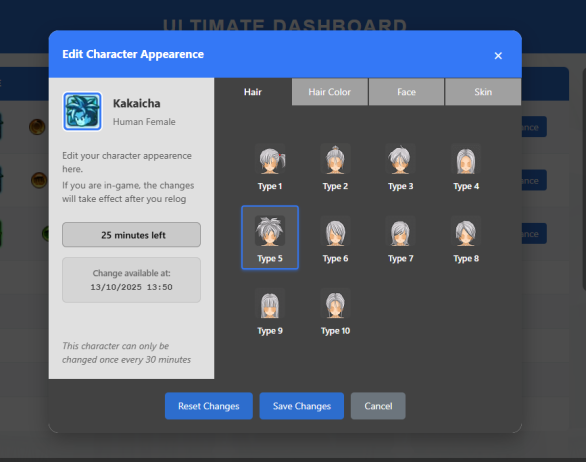
You can freely change the following aspects of your character:
- Hair style
- Hair color
- Face
- Skin tone
All with just a short cooldown of a few minutes between edits!

✨ Express yourself! Customize your look anytime and stand out in the world of Ultimate DBO! ✨

